Ally Authenticated Responsive Redesign
Background
Ally originally had a silo-ed company structure. Each line of business worked by it's own set of rules and there was rarely any cross-pollination. Over time it became clear that this structure wouldn't work for the company and it wouldn't work for customers.
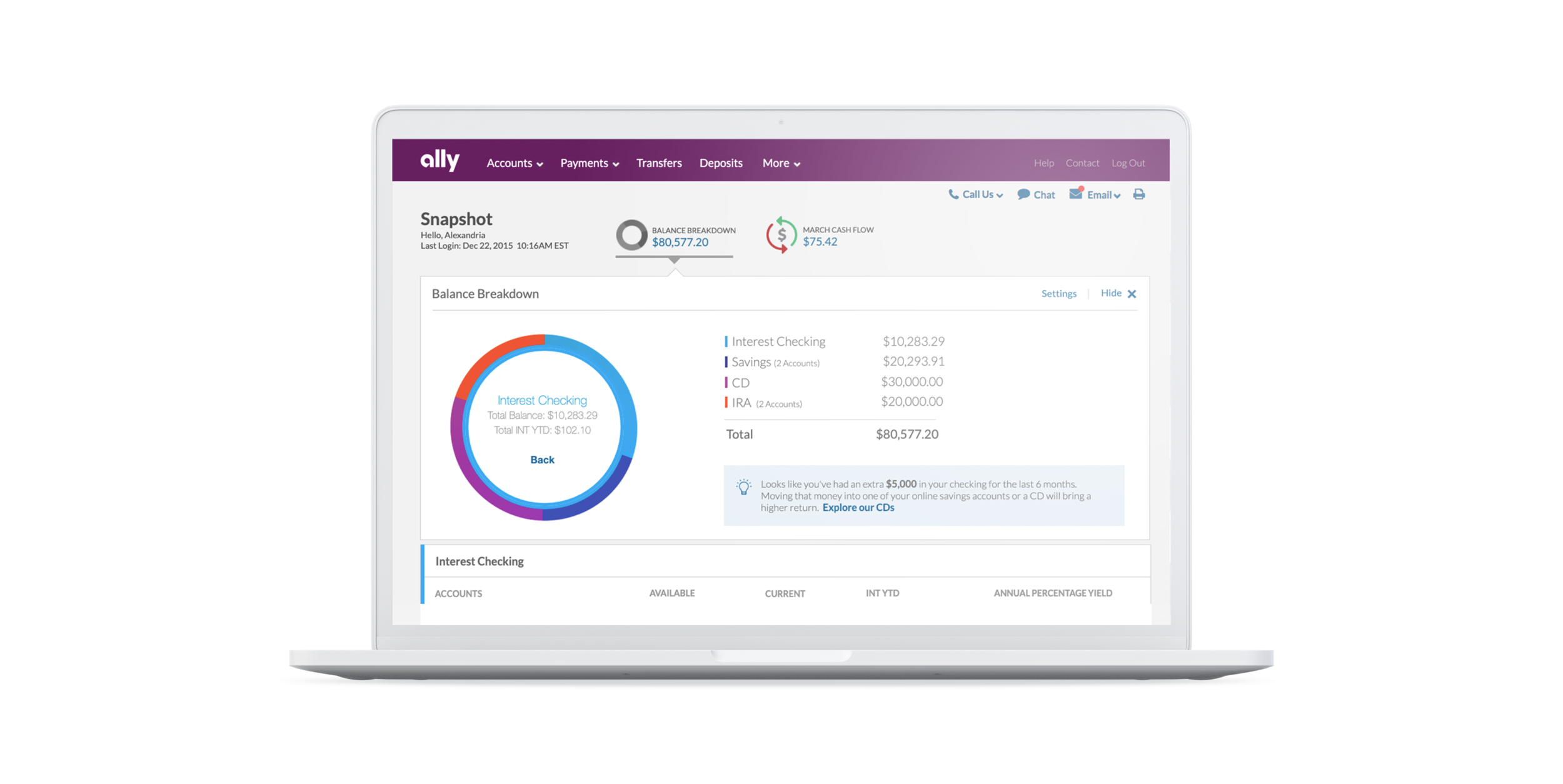
Customers wanted the ability to see and manipulate all of their financial information in one place.
The business wanted the ability to cross-sell other products and share data across lines of business.
This ultimately meant, big changes needed to happen.
Project GOALS
Create one login flow for all customers
Unite lines of business without confusing customers
Combine overlapping functions to create a seamless experience
Allow for reorganization based on user preference
Re-develop a navigation that could scale with product growth
Make everything we touch responsive
Research
Normally, I’ll start a project by doing a competitive analysis, but this project was a little bit different. I had just moved from a more consumer facing IA role, to a role creating solely for the authenticated space. Not knowing the in’s and out’s of what we offered and how, I started this project by doing a content and navigation audit for all lines of business.
The navigation audit was fruitful in pinpointing the similarities and differences between the systems we were combining.
The content audit helped explain why there were differences in the system site maps and basically gave me a starting point to understand what could be combined or simplified.
Next was a competitive analysis, where we compared 5 financial institutions (Capital One, Wells Fargo, BOA, BB&T and USAA) and 3 up and coming P2P payment apps (Google Wallet, PayPal and Venmo). Our main findings were that no-one was really combining lines of business very well. Most had separate logins for each LOB, complex navigation schemes and lacked a responsive experience. The P2P payment apps were on the right track, but they also didn't have all of the functionality we needed to account for.
The persona breakdown really helped us focus on the primary tasks and tools that customers are looking for within each line of business.
Personas
*These represent a high level summary of main goals/expectations of each persona group, not necessarily the personas themselves - there are too many :)
Bank Customer
Main Goals: View Account Balances, View Transactions, Make a Transfer, Pay Bills, Deposit Money
Expectations: Good Customer Service, Quick Payment, Easily in and out for primary tasks
Delighters: Having all accounts easily accessible in one place, data visualization, helpful tips to encourage financial responsibility
Frequency: Dependent on account type (Checking, most frequent)
Auto Customer
Main Goals: Pay Bill, Set up automatic payment, View Transactions
Expectations: An easy way to make a payment, Customer Service, Clear enrollment instructions
Delighters: View progress, understand how payment will effect principle, FICO Score
Frequency: Once a Month
Credit Card Customer
Main Goals: View balance, View Transactions, Pay Bill, View and act on rewards
Expectations: Points, Rewards, Integrated Experience, Credit Monitoring, Deals
Delighters: Exclusivity, Customer Service
Frequency: Once a Month
Mortgage Customer
Main Goals: Pay Bill, Set up Automatic Payment, Pay towards principle,
Expectations: Easy bill payment, Integrated Experience, Good Customer Service
Delighters: Home Loan Valuation, Progress, Discounts, Payment Calculators
Frequency: Once a Month or Never
Invest Customer
Main Goals: View Holdings/Balances/Gains/Losses/Watchlist, Trade, Research, Analysis
Expectations: Most up to date data stream, Easy to Trade, Customization
Delighter: Low prices per trade, Customization, Learning Opportunities, Communities
Frequency: Daily (Day trader), Multiple times a week
Navigation
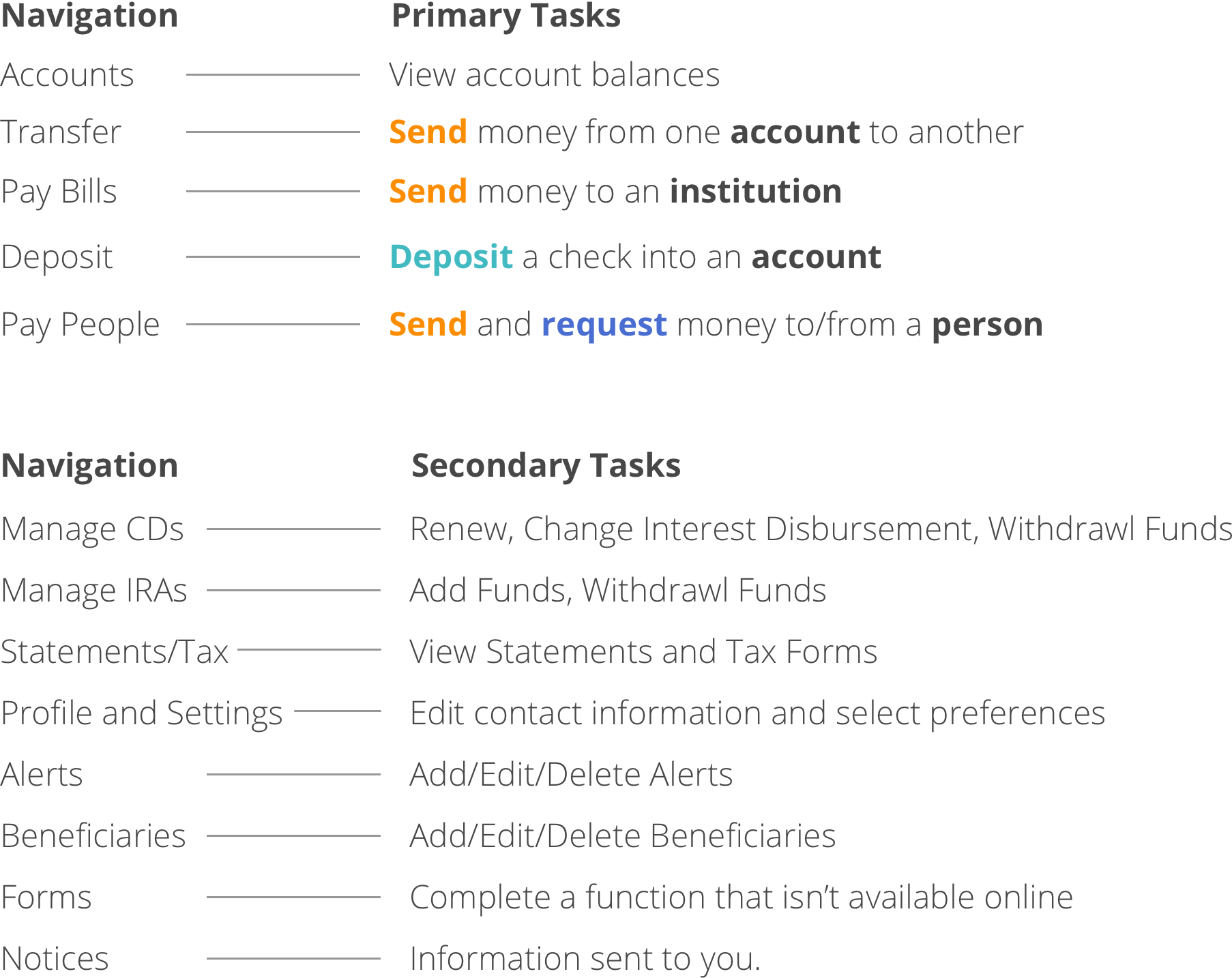
During our research, we found a recurring trend. Users tended to bucket tasks into two categories, tasks they complete all the time and tasks they complete sparingly. Keeping that in mind, we started ideating different structures that could increase the prominence of primary actions and decrease the prominence of secondary actions.
The next obstacle we struggled with was which of the actions should be global and which should be local. Some tasks were only available to certain account types and some tasks were overlapping.
We came to the conclusion that the only way we were going to help customers complete tasks efficiently was if we made the tasks contextual to the account type, dynamic based on account type, and also globally accessible.
Sketching
Before we got in too deep, we started sketching based on what we knew.
Customers want to get in and get out
Primary tasks are viewing account balances and transactions, making transfers, making payments, and setting up payments
Some pieces were used a lot and some very little
Customers want a clean and simple view
Customers want to be able to track their spending and understand how spending will impact their long term financial goals
What we did...
Highlighted primary tasks by pulling them out of the hamburger menu at larger screen sizes
Grouped all common tasks together (Pay Bills, Pay People, Transfers, Deposits) into Move Money menu
Created an activity area, where all activity could be viewed at a glance in a calendar or list format
Created a miscellaneous menu containing all of the least commonly used features on the site, grouped into scannable categories
Created an area for reporting or data analysis (this would hold PFM tools to help customers reach their financial goals for the future)
Created a simplified view of dashboard content that focused on the most likely scenario
Allowed for easy access to contact information to match brand standards
Added financal management tools to the dashboard to help customers feel in control of their finances
Roadblocks
No design can make it to development without some types of roadblocks. Here's the short list.
The credit card product servicing was hosted by a 3rd party
The auto product was moving all customer information into a new database
The invest product was a company we bought and integrated all while figuring out our new credit card product
None of the customer service systems were being integrated at the same time as the line of business
Payment flows for each line of business would not be able to integrate with each other
PopMoney was moving to a new vendor
Transfer flows could not be combined before launch. Each line of business had a separate access point
CD customers were the most important user group
A legacy donut graphic had to be included in some way
Dueling business partners
I could go on, but I'll spare you...
Solution
Regardless of all of the roadblocks, we launched the end product and it was an amalgamation of sorts.
Design Wins
Exposing the navigation - Before the update, most of our customers, even after extended use of the hamburger navigation on desktop still either resented it's presence or had to do a double take as to how to get to their primary tasks. The exposed navigation allowed customers to get to their tasks efficiently, without having to think.
Responsive - The Ally authenticated space is now on it's way towards being a fully responsive interface. This was a tedious task. Most of our product teams did not know anything about responsive interfaces before we started the project. There was a lot of explaining and re-explaining, process changes, communication barriers etc. Thankfully, now all the team members have strong knowledge-base around the subject matter and understand how important it is for us to continue towards our fully responsive goal.
Consolidated Experience - Customers now have the ability to see all of their Ally accounts in one place. Next is consolidation of the types of money movement.
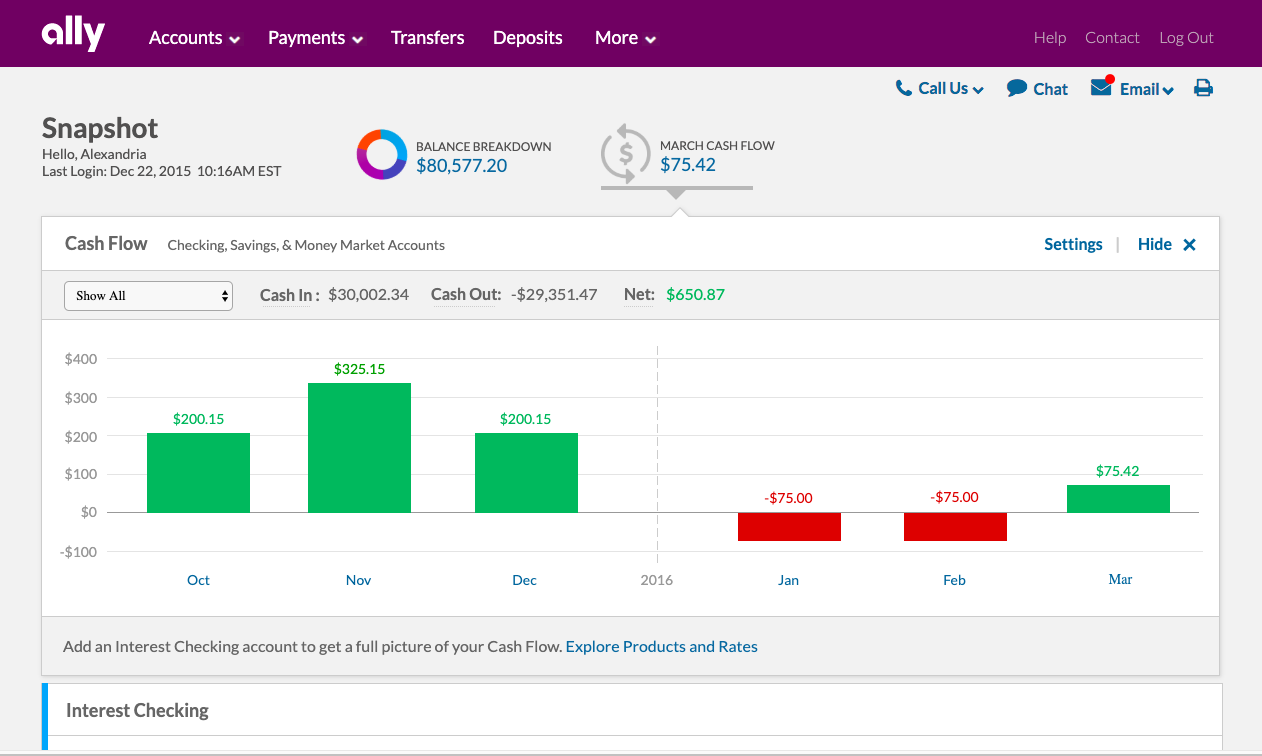
Cash Flow - Customers would have the ability to see their cash flow from month to month to better understand how much they
FUTURE WINS
Remove hamburger navigation completely (from mobile) and expose more tasks contextually
Combine all forms of money movement and allow for cross-pollination of lines of business
Financial management tools that give customers a full picture of their financial life
Simplified dashboard view
Goal integration